
Mastering personal finances can feel daunting, but it doesn’t have to be. Free expense tracking apps offer a powerful, accessible solution to take control of your spending habits. These handy tools provide a clear picture of your financial health, enabling informed decisions and paving the way towards financial wellness. From tracking everyday expenses like groceries and entertainment to managing larger bills, these apps simplify the process and make budgeting less of a chore.
This exploration delves into the world of free expense tracking apps, comparing their features, benefits, and limitations. We’ll guide you through selecting the perfect app based on your specific needs and offer practical strategies for effective expense tracking, ultimately empowering you to achieve your financial goals.
Top Free Expense Tracking Apps
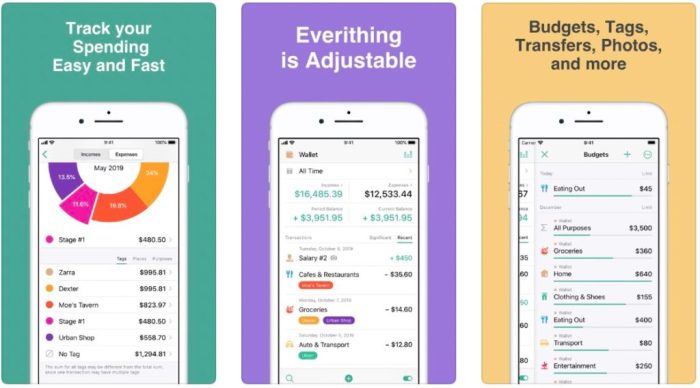
Choosing the right expense tracking app can significantly simplify your financial management. Many excellent free options are available, each offering a unique set of features and user experiences. This section will compare several popular choices, highlighting their strengths and weaknesses to help you make an informed decision.
Top Free Expense Tracking Apps: Features and Comparisons
A comparison of five popular free expense tracking apps, considering their key features, advantages, and disadvantages, is presented below. This table allows for a direct side-by-side comparison to aid in selection.
| App Name | Key Features | Pros | Cons |
|---|---|---|---|
| Mint | Budgeting tools, account aggregation, bill payment reminders, credit score monitoring, investment tracking. | Comprehensive features, user-friendly interface, excellent account aggregation. | Can be overwhelming for users with simple needs; relies heavily on advertisements. |
| Personal Capital | Net worth tracking, investment analysis, retirement planning tools, budgeting features. | Strong investment tracking capabilities, detailed financial overview. | Focuses more on investment management than everyday expense tracking; requires a deeper understanding of finance. |
| Goodbudget | Envelope budgeting system, multi-user support, cloud synchronization. | Simple and intuitive interface, well-suited for envelope budgeting. | Limited reporting and visualization options compared to other apps. |
| PocketGuard | Spending analysis, budgeting tools, “In-pocket money” feature showing available funds. | Clearly shows how much money is available to spend; user-friendly interface. | Limited customization options for budgeting categories. |
| Fudget | Simple budgeting, expense tracking, goal setting. | Clean and minimalistic design, easy to use for basic expense tracking. | Lacks advanced features such as account aggregation or detailed reporting. |
The user interfaces of these apps vary considerably. Mint and PocketGuard, for example, prioritize a clean and intuitive design, making them easy to navigate even for less tech-savvy users. Personal Capital, on the other hand, presents a more complex dashboard reflecting its broader range of features, potentially making it less accessible to beginners. Goodbudget and Fudget opt for simpler interfaces, focusing on ease of use over extensive feature sets.
The best choice depends heavily on individual needs and preferences regarding complexity and feature richness.
Choosing the Right App Based on Needs
Selecting the perfect expense tracking app hinges on understanding your individual financial management style and goals. Different apps cater to varying levels of complexity, from simple expense logging to sophisticated budgeting and financial planning. Choosing wisely ensures the app becomes a valuable tool rather than a frustrating chore.App features directly correlate with user needs. A minimalist approach might suffice for someone simply wanting to track spending, while a more comprehensive solution is needed for those aiming to create detailed budgets, analyze spending patterns, or integrate with other financial accounts.
Matching App Features to User Needs
Users with basic needs, such as monitoring daily spending and generating simple reports, might find a straightforward app with basic input fields and straightforward reporting sufficient. Conversely, individuals seeking to manage multiple accounts, set detailed budget categories, and track investments would benefit from apps offering advanced features like automated categorization, recurring transaction tracking, and account aggregation. For example, someone paying off debt might prioritize apps with debt tracking capabilities, while a freelancer might favor apps that integrate with invoicing software.
Platform Compatibility, Security, and Customer Support
The app’s compatibility with your preferred devices (iOS, Android, web) is crucial for seamless integration into your daily routine. A lack of cross-platform compatibility could necessitate using multiple apps or manually transferring data, creating unnecessary inconvenience. Equally important is data security; consider apps with robust encryption and privacy policies to protect sensitive financial information. Reliable customer support, easily accessible through various channels (email, phone, online help), is vital for resolving any technical issues or queries that may arise.
A responsive support team can quickly address problems and ensure a positive user experience.
Decision-Making Flowchart for App Selection
Imagine a flowchart beginning with a diamond shape labeled “What are your primary financial goals?”. Branches from this diamond lead to rectangular boxes representing different needs: “Simple expense tracking,” “Budgeting and financial planning,” and “Debt management.” Each of these boxes then branches to another diamond asking “What devices do you use?”. The branches from this diamond lead to rectangular boxes indicating platform compatibility: “iOS only,” “Android only,” “Both iOS and Android,” and “Web-based”.
From each of these boxes, a final diamond asks “What level of security and support is required?”. Branches lead to final rectangular boxes representing different app choices based on the user’s needs and priorities, for example, “Basic expense tracker (low security, limited support)”, “Advanced budgeting app (high security, excellent support)”, or “Debt management app (medium security, good support)”.
The flowchart culminates in a final rectangular box labeled “Selected App”. This visual representation guides users through a systematic process, ensuring they choose an app that perfectly aligns with their specific requirements.
Effective Expense Tracking Methods and Strategies
Effective expense tracking is more than just recording your spending; it’s about gaining a clear understanding of your financial habits and making informed decisions. By implementing robust tracking methods and strategies, you can identify areas for improvement, achieve your financial goals, and build a healthier relationship with your money. This involves not only diligent record-keeping but also proactive planning and consistent monitoring.Implementing effective expense tracking requires a combination of diligent record-keeping and strategic planning.
The key is to find a system that fits your lifestyle and technological comfort level, whether it’s a simple spreadsheet or a sophisticated mobile app. Consistent data entry is crucial for accurate analysis, and regular review of your tracked expenses allows you to identify trends and make necessary adjustments to your spending habits. Remember, the goal isn’t just to track, but to learn and adapt.
Categorizing and Tagging Transactions
Categorizing and tagging transactions are fundamental to effective expense tracking. Categorization involves grouping similar expenses together (e.g., groceries, transportation, entertainment). This allows for a clearer overview of where your money is going. Tagging adds further granularity, allowing you to add specific labels to transactions (e.g., “work lunch,” “movie night,” “client meeting”). For instance, a grocery transaction might be categorized as “Groceries” and tagged with “weekly shop” or “emergency supplies.” This detailed breakdown provides insights beyond basic categorization, enabling more precise budgeting and spending analysis.
This detailed information empowers you to identify areas where you might be overspending and make informed decisions about your future spending.
Setting Realistic Budgeting Goals and Monitoring Progress
Setting realistic budgeting goals is crucial for successful expense tracking. Start by honestly assessing your income and expenses. Use your expense tracking app to analyze your spending habits over a period of time (a month or two) to identify where your money is going. Based on this analysis, set achievable goals, such as reducing spending in a specific category by a certain percentage each month.
Regularly monitor your progress using your chosen app’s reporting features. For example, if your entertainment spending averages $200 per month, a realistic goal might be to reduce it to $150 over the next three months. Track your progress weekly and adjust your strategies as needed. This iterative approach ensures that your budget remains relevant and effective.
Best Practices for Maintaining Accurate and Consistent Expense Tracking Records
Maintaining accurate and consistent expense tracking records is essential for achieving financial clarity. Here are some best practices:
- Enter transactions promptly: Record expenses as soon as possible after they occur to minimize the risk of forgetting details or misremembering amounts.
- Use consistent categories and tags: Develop a standardized system for categorizing and tagging transactions to ensure data consistency and facilitate accurate analysis.
- Reconcile your accounts regularly: Compare your tracked expenses with your bank and credit card statements to identify any discrepancies and ensure accuracy.
- Review your data regularly: Analyze your expense data regularly (weekly or monthly) to identify trends and areas for improvement.
- Back up your data: Regularly back up your expense tracking data to protect against data loss.
Expense Tracking and Financial Wellness
Effective expense tracking is intrinsically linked to improved financial health. By understanding where your money goes, you gain control over your finances, paving the way for better budgeting, saving, and overall financial well-being. This knowledge empowers informed decision-making, reducing financial stress and fostering a more secure financial future.Expense tracking apps significantly contribute to this process by providing a clear and organized picture of your spending habits.
These apps automate data entry, often connecting directly to bank accounts and credit cards, eliminating the manual effort involved in traditional methods. This automated tracking allows for a comprehensive overview of spending patterns, quickly revealing areas where money might be unnecessarily spent.
Identifying Savings Opportunities Through Expense Tracking
Expense tracking apps excel at highlighting areas for potential savings. For instance, an app might reveal that a significant portion of your budget is allocated to dining out. This insight allows for conscious adjustments, such as reducing restaurant meals and opting for home-cooked meals more frequently. Similarly, subscription services, often overlooked, become easily identifiable. The app might show recurring charges for streaming platforms or gym memberships that are underutilized, leading to the informed decision to cancel or downgrade those services.
By identifying these less-essential expenses, individuals can redirect funds towards savings or debt reduction.
Informed Financial Decisions Through Data Review
Regular review of expense tracking data is crucial for effective financial management. Analyzing spending trends over time, perhaps monthly or quarterly, provides valuable insights into spending patterns and allows for proactive adjustments. For example, tracking spending during the holiday season might reveal an overspending trend. This knowledge allows for budgeting adjustments in future holiday seasons to prevent similar overspending.
Similarly, consistent review can highlight unexpected expenses, such as car repairs or medical bills, prompting the creation of emergency funds or adjustments to insurance coverage. This data-driven approach ensures that financial decisions are based on concrete evidence rather than assumptions, leading to more informed and effective financial planning.
Security and Privacy Considerations for Free Apps
Using free expense tracking apps offers convenience, but it’s crucial to understand the potential security and privacy risks involved. These apps often handle sensitive financial data, making them attractive targets for cybercriminals. Understanding these risks and implementing appropriate safeguards is vital to protect your financial well-being.Free expense tracking apps, while convenient, present inherent security and privacy challenges. The accessibility of your financial data raises concerns about unauthorized access, data breaches, and potential misuse of personal information.
The level of security and privacy protection varies significantly between different apps, underscoring the need for careful consideration before selecting an app. Understanding the security measures implemented by the app developer, and proactively protecting your own data, are critical steps in mitigating these risks.
Data Encryption and Storage
The method used to encrypt and store your data is a critical aspect of an app’s security. Look for apps that utilize robust encryption both in transit (while data is being sent to and from the app) and at rest (while data is stored on the app’s servers). Strong encryption, such as AES-256, significantly reduces the risk of data interception and unauthorized access.
Apps should clearly state their encryption methods in their privacy policies. For example, an app might state that “All user data is encrypted using AES-256 encryption both in transit and at rest.” The absence of such a statement, or vague descriptions, should raise concerns.
Password Strength and Two-Factor Authentication
Strong passwords are the first line of defense against unauthorized access. Avoid easily guessable passwords and utilize a combination of uppercase and lowercase letters, numbers, and symbols. Consider using a password manager to generate and securely store complex passwords. Two-factor authentication (2FA) adds an extra layer of security. This typically involves receiving a code via text message or authenticator app to verify your identity, even if someone has your password.
Apps offering 2FA provide a significant increase in security. For example, Mint, a popular budgeting app, offers 2FA as an optional security feature.
Privacy Policy Analysis: A Comparison
Privacy policies Artikel how an app collects, uses, and shares your data. Carefully reviewing the privacy policies of several popular free expense tracking apps reveals significant differences. Some apps may share anonymized data with third-party partners for analytics purposes, while others may be more transparent about data sharing practices. For instance, a comparison might reveal that app A clearly Artikels its data sharing practices and offers granular control over data permissions, whereas app B’s policy is less transparent.
Consumers should actively compare these policies to make informed decisions based on their comfort levels with data sharing.
Beyond Basic Expense Tracking
Many free expense tracking apps go beyond simply recording your spending. They offer a range of advanced features designed to help you take control of your finances and achieve your financial goals. These features can significantly enhance your financial planning and management, moving you beyond simple budgeting to a more holistic approach to personal finance. By leveraging these tools, you can gain a clearer understanding of your financial health and make informed decisions about your future.While basic expense tracking provides a snapshot of your spending, advanced features provide a more comprehensive view, allowing for deeper analysis and proactive financial management.
These features often integrate different aspects of personal finance, providing a centralized platform for tracking various financial activities. This integration simplifies the process and provides a clearer, more unified picture of your overall financial situation.
Debt Tracking Capabilities
Several free apps incorporate debt tracking modules. These modules allow users to input details of their outstanding debts, including loan amounts, interest rates, minimum payments, and due dates. The app then calculates the total debt, provides an amortization schedule (a table showing the repayment schedule of a loan), and may even suggest strategies for debt reduction, such as the debt snowball or debt avalanche methods.
For example, a user could input their credit card balance, interest rate, and minimum payment, and the app would project how long it would take to pay off the debt under different payment scenarios. This allows for informed decision-making regarding debt repayment strategies. This feature transforms a simple expense tracker into a powerful debt management tool.
Investment Tracking and Portfolio Management
Some advanced free apps include investment tracking capabilities. Users can link their brokerage accounts (where applicable) or manually input investment details, including asset type, purchase price, and current value. The app will then calculate the overall portfolio value, track gains and losses, and potentially provide performance benchmarks. For instance, a user could track their investments in stocks, bonds, and mutual funds, allowing them to monitor their portfolio’s performance over time and make informed decisions about rebalancing or adjusting their investment strategy.
This feature can help users visualize the growth (or decline) of their investments and aid in long-term financial planning.
Goal Setting and Financial Projections
Advanced features frequently include goal-setting tools. Users can define financial goals, such as saving for a down payment on a house, paying off student loans, or saving for retirement. The app then helps users create a plan to achieve those goals by suggesting savings targets and tracking progress. For example, if a user sets a goal of saving $20,000 for a down payment in three years, the app could calculate the required monthly savings amount and provide visual progress updates.
This feature promotes proactive financial planning and provides motivation to reach financial objectives.
Advantages and Disadvantages of Utilizing Advanced Features in Free Apps
The decision to utilize advanced features within free apps should be based on a careful assessment of both advantages and disadvantages.
- Advantages: Enhanced financial planning, improved debt management, better investment tracking, goal-oriented savings, consolidated financial overview, increased financial awareness, potentially improved financial discipline.
- Disadvantages: Limited features compared to paid apps, potential for data security concerns (addressed earlier), reliance on self-input accuracy (manual input errors), lack of personalized financial advice, possible limitations in account linking and data integration.
Illustrative Examples of Expense Tracking Reports
Expense tracking apps offer a range of reports to help users visualize their spending habits and make informed financial decisions. Understanding these reports and their capabilities is crucial for effectively managing personal finances. These reports transform raw transaction data into actionable insights, allowing for better budgeting and financial planning.
Monthly Summary Reports
Monthly summary reports provide a high-level overview of income and expenses for a specific month. This report typically displays total income, total expenses, and the resulting net income or loss. It often categorizes expenses into broad groups like housing, transportation, food, and entertainment, offering a quick snapshot of where the majority of money is spent. Users can use this to identify areas for potential savings and track progress towards financial goals.
For example, a user might see that their entertainment expenses significantly exceeded their budget, prompting them to adjust spending habits in the following month.
Category Breakdown Reports
Category breakdown reports offer a more granular view of spending, dissecting expenses into more specific categories. Instead of just “food,” this might include “groceries,” “restaurants,” and “coffee,” providing a much clearer picture of spending patterns. This level of detail allows users to pinpoint areas of overspending and identify potential areas for budget adjustments. For instance, a user might discover that restaurant meals constitute a large portion of their food budget, leading them to prioritize home-cooked meals.
Net Worth Statements
Net worth statements, while not always a standard feature in free apps, provide a comprehensive overview of an individual’s financial health. This report calculates net worth by subtracting total liabilities (debts) from total assets (possessions and investments). Tracking net worth over time allows users to monitor their financial progress and identify trends. A user might see a consistent increase in their net worth due to disciplined saving and investment strategies, providing positive reinforcement for their financial habits.
Conversely, a declining net worth might indicate the need for adjustments to spending or debt management strategies.
Sample Monthly Expense Report
Let’s imagine a simplified monthly expense report for the month of October: October 2024 Expense ReportIncome: $4,000Expenses:Housing: $1,200Transportation: $300Food: $600 (Groceries: $400, Restaurants: $200)Utilities: $200Entertainment: $400Clothing: $100Other: $200Total Expenses: $3,000Net Income: $1,000This report clearly shows the total income, a detailed breakdown of expenses by category (including sub-categories for food), and the resulting net income.
The user can quickly see that housing and food are the largest expenses, while entertainment is also a significant cost. This visual representation facilitates a clear understanding of where money is going and helps in identifying potential areas for budget adjustments.
Ultimately, the best free expense tracking app is the one that seamlessly integrates into your lifestyle and helps you achieve your financial objectives. By understanding your needs, carefully evaluating app features, and implementing effective tracking strategies, you can harness the power of technology to gain clarity, control, and confidence in managing your finances. Remember, consistent tracking and regular review of your spending habits are key to long-term financial success.
FAQ Summary
Are free expense tracking apps secure?
While generally secure, free apps may have limitations compared to paid versions. Choose reputable apps with strong privacy policies and utilize strong passwords and two-factor authentication where available.
What if I need help using the app?
Most apps offer online help sections or FAQs. Some may also provide email or phone support, though this is less common with free versions.
Can I import data from my bank account?
Many apps offer bank account linking for automatic transaction import, but this feature may vary depending on the app and your bank’s compatibility.
Do free apps offer advanced features?
Some free apps offer limited access to advanced features like investment tracking or debt management, often requiring a subscription for full functionality.


